

How it works
MCP gives an AI assistant a standard way to discover and call tools. You connect the server once; the assistant then chooses a tool, sends its arguments and uses the returned data to answer your question. You can inspect tool calls in your client.
Our server is hosted for you: no local server, package installation or scraping is needed. It exposes the five tools below over Streamable HTTP. All are read-only; they cannot place trades, edit your watchlist or change your account. Research-page search returns links; it does not make every REST dataset an MCP tool.
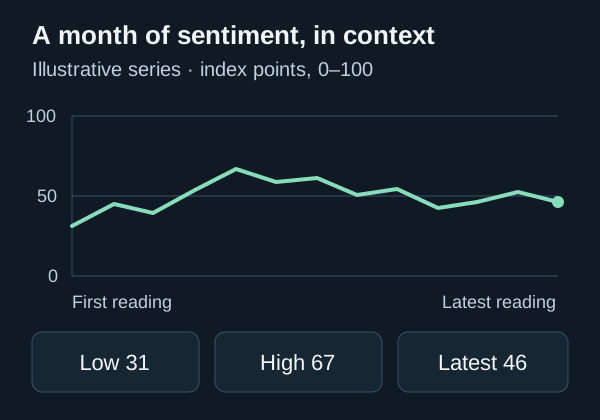
A tool call is a request for a specific piece of information. For example, the assistant sends { "days": 30 } to the history tool and receives dated readings. It can then calculate a range or explain the changes. Those calculations are performed by the assistant, so ask it to show its working when a derived number matters to your research.
Quickstart
- Sign in and activate Pro. Free and Plus keys cannot access MCP.
- Create a key in your API keys dashboard. Copy it when shown; its plaintext cannot be recovered later.
- Store the key as
FEARANDGREED_API_KEYin your environment or your client's private secret storage. - Add
https://fearandgreedgraph.com/mcpas a remote HTTP MCP server and sendAuthorization: Bearer YOUR_PRO_API_KEY. Use one of the configurations below. - Enable the server, reconnect your client and confirm the five tools appear. Ask it to use
get_site_guideas your first check.
macOS / Linux terminal · paste your key, then press Enter (input hidden)
read -rs FEARANDGREED_API_KEY
export FEARANDGREED_API_KEY
This sets the variable for the current shell and applications launched from it. It does not automatically pass the key to an already-open desktop app. Restart the client from that environment or configure its private secret storage. After setup, check for a connected server and all five tools before asking for data.
A compatible client must support Streamable HTTP and custom Authorization headers. This server uses API keys; it does not provide an OAuth sign-in flow. A client that only accepts a URL or OAuth cannot authenticate directly.
Set up in Cursor
Merge this entry into ~/.cursor/mcp.json for personal use across projects, or .cursor/mcp.json for one project. Preserve your existing servers. Make the environment variable available to the Cursor process before opening it.
{
  "mcpServers": {
    "fearandgreed": {
      "url": "https://fearandgreedgraph.com/mcp",
      "headers": {
        "Authorization": "Bearer ${env:FEARANDGREED_API_KEY}"
      }
    }
  }
}
Enable the server in Cursor's MCP settings, reconnect if needed and open an Agent chat. Confirm its tools are available, then ask an example question below. Remote configurations do not load an envFile. See the official Cursor MCP documentation.
Set up in Claude Code
With Claude Code installed, run this command in your terminal. The single quotes preserve the variable reference so Claude Code resolves it when connecting. Set FEARANDGREED_API_KEY in the environment that launches Claude Code.
claude mcp add --transport http --scope user fearandgreed https://fearandgreedgraph.com/mcp \
  --header 'Authorization: Bearer ${FEARANDGREED_API_KEY}'
User scope makes this server available across your projects. Run claude mcp listto check the configuration, then open Claude Code and use /mcp to inspect the connection and tools. See the official Claude Code MCP documentation.
Available tools
These are the tools available now. Your assistant may display them with a server-name prefix.
get_site_guide
Explains the site, data sources, methodology and research pages. A useful first call.
Arguments: No arguments
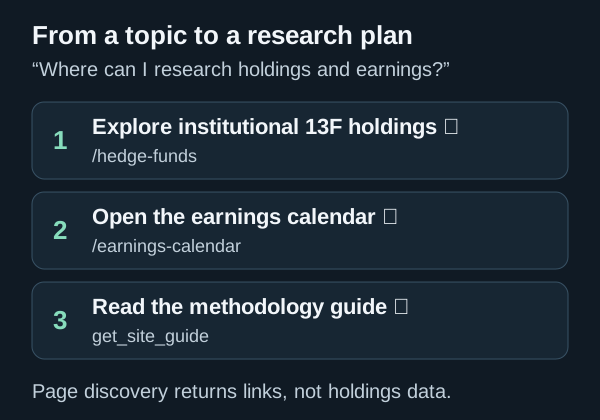
find_site_pages
Finds up to eight relevant page links. Query must be 2–100 characters; this locates pages rather than retrieving their holdings or datasets.
Arguments: { "query": "hedge funds" }
get_fear_greed_index
Returns the latest dated reading, sentiment zone, previous close, comparisons and underlying indicators.
Arguments: No arguments
get_fear_greed_history
Returns the latest daily readings with dates and zones. Choose 1–365 readings; defaults to 30 and returns fewer if the feed has less history.
Arguments: { "days": 30 }
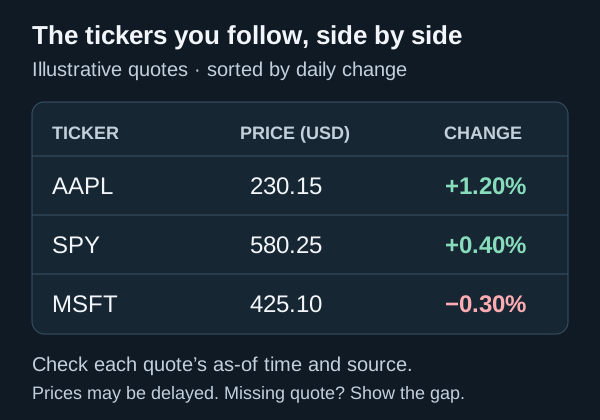
get_stock_quotes
Returns the latest available quote and daily change for 1–10 symbols. Quotes can be delayed or unavailable; check each quote’s timestamp.
Arguments: { "symbols": ["AAPL", "MSFT", "SPY"] }
Tools return text containing JSON and structured data. Sentiment responses include dates and source links; quote results link to each stock page. A source failure can produce a tool error or a missing quote, so ask your assistant to report gaps.
What to ask your assistant
Good prompts name the source, specify the time range or tickers, and describe the output you want. The illustrated workflows abovepair each prompt with the exact tools it can use. Here are a few shorter starting points:
- “Use Fear & Greed MCP to get the latest index reading. Include its date, zone and change from the previous close.”
- “Retrieve the last 30 Fear and Greed readings. Summarize the range and cite the source.”
- “Get quotes for AAPL, MSFT and SPY. Show the daily percentage changes and flag missing or delayed quotes.”
- “Find Fear & Greed pages about hedge funds and earnings. Give me the relevant links.”
- “Explain the Fear and Greed methodology using the site guide.”
If the assistant answers without a tool call, explicitly ask it to use the Fear & Greed server. Check the returned date or quote timestamp before treating data as current. The sentiment series is daily, and quotes may be delayed.
A complete example: from request to answer
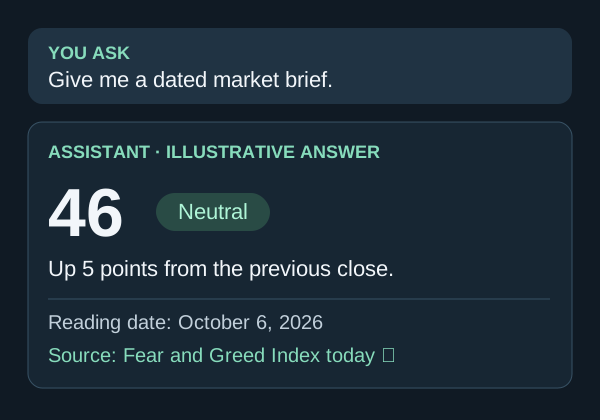
Ask for the latest index and its change from the previous close. Your client can send the following tool message after establishing the MCP connection. You normally do not type this JSON yourself; it shows what happens behind your question.
{
  "jsonrpc": "2.0",
  "id": 2,
  "method": "tools/call",
  "params": {
    "name": "get_fear_greed_index",
    "arguments": {}
  }
}
Illustrative structuredContent excerpt · sample data, not a live response
{
  "source": "https://fearandgreedgraph.com/fear-and-greed-index-today",
  "as_of": "2026-10-06",
  "current": 46,
  "zone": "Neutral",
  "previous_close": 41
}
From these sample fields, the assistant can say: “The index was 46 (Neutral) on October 6, 2026, up 5 index points from the previous close of 41.” It should link the source and keep the date attached. The actual tool response also includes comparisons and indicators. The five-point change is calculated from the two readings; it is not a five-percent market return.
Access, pricing and rate limits
MCP is included in Pro; use the same account key as the REST API. See plans and pricing for the subscription. Your AI client may charge separately for its own usage.
The current Pro limit is 2,500 requests per hour per key, shared between MCP and authenticated REST requests. MCP protocol requests such as initialization and tool discovery count too; one chat question may make several requests. Responses include X-RateLimit-Limit and X-RateLimit-Remaining. On 429, wait the number of seconds in Retry-After before retrying.
The MCP history tool is capped at 365 recent readings even on Pro. For other datasets or formats, consult the REST endpoint referenceand its availability labels. Personal and single-product use is permitted; redistribution or resale of raw data is not.
Verify the connection and troubleshoot
To isolate a client configuration issue, run this initialization request from a terminal with your key in the environment. A successful response is HTTP 200 with a JSON-RPC result containing server information and capabilities; the body may be JSON or an event stream. Your MCP client handles the remaining handshake.
curl -i https://fearandgreedgraph.com/mcp \
  -H "Authorization: Bearer $FEARANDGREED_API_KEY" \
  -H "Content-Type: application/json" \
  -H "Accept: application/json, text/event-stream" \
--data '{"jsonrpc":"2.0","id":1,"method":"initialize","params":{"protocolVersion":"2025-11-25","capabilities":{},"clientInfo":{"name":"quickstart","version":"1.0"}}}'- 401 Unauthorized: Check the bearer header, environment variable and key. A missing, invalid or revoked key fails authentication.
- 403 Forbidden: Confirm the key belongs to a Pro account. A rejected host or Origin header can also cause this; use the exact HTTPS server URL.
- 405 Method Not Allowed: Opening
/mcpin a browser sends GET. The server handles MCP messages through POST; a GET 405 is expected. - 429 Too Many Requests: Pause for
Retry-After. Reduce repeated calls and automatic retries. - No tools or an OAuth prompt: Check HTTP transport and custom header support, enable the server and reconnect. Use bearer-key configuration rather than OAuth.
- Sentiment feed unavailable or quote missing: An upstream feed may be temporarily unavailable. Try again later and keep the missing data explicit.
Keep your key private
Use environment references or private secret storage. Keep plaintext keys out of shared configuration, source control, screenshots and chat messages. Create one key per integration so you can revoke it independently.
If a key leaks, revoke it in your dashboard, create a replacement, update the client and reconnect. Read-only tools still consume your allowance, so treat the key as a credential.